WordPress vs Squarespace for Small Business: Which Is Best?
If you’re a small business owner, your website is often the first impression customers have of you.
It’s your digital storefront, your 24/7 sales rep, and—if done right—your hardest-working marketing asset.
But before you can start designing, writing, and selling, you have to answer the big question:
Which platform should I build it on?
For most small business owners, the choice often comes down to two popular contenders: WordPress and Squarespace.
They’re both powerful, but they cater to different needs. Choosing the right one can mean the difference between a website that works for you and one that becomes a constant headache.
Let’s break it down.
Quick Comparison Table
| Feature | WORDPRESS | SQUARESPACE |
|---|---|---|
| Ease of Use | Steeper learning curve, more control | Beginner-friendly, drag-and-drop |
| Design Flexibility | Unlimited with themes & custom code | Beautiful but limited templates |
| Pricing | Hosting + domain + plugins (varies) | All-in-one monthly fee |
| Scalability | Extremely scalable with plugins & dev work | Extremely scalable with plugins & dev work |
| E-commerce | WooCommerce or other integrations | Built-in e-commerce features |
| SEO Tools | Advanced with plugins | Good basics, fewer customization options |
| Maintenance | Manual or hire a web pro | Handled by Squarespace |
| Integrations | Thousands via plugins | Limited built-in & third-party options |
WordPress Overview
WordPress is the world’s most popular website platform, powering over 40% of all sites on the internet. It’s open-source, endlessly customizable, and built for growth. But with great power comes… well, a little more responsibility.
Pros of WordPress
Flexibility to Build Anything
From a single-page portfolio to a massive e-commerce store, WordPress can handle it all.Thousands of Plugins
Want a booking calendar? Membership system? SEO optimizer? There’s a plugin for that.Custom Design Freedom
No “template jail.” You can customize every pixel with themes, builders like Elementor, or custom code.Ownership & Portability
Your site lives on your hosting, so you’re not locked into one provider.Scalable
Start small, then expand features as your business grows.
Cons of WordPress
Requires Setup
You’ll need to arrange hosting, install WordPress, and set up themes/plugins.Maintenance Is on You
You’re responsible for updates, backups, and security—unless you hire someone.Learning Curve
Beginners can feel overwhelmed without guidance.Quality Control
Because anyone can create plugins/themes, you need to choose reputable ones.
Squarespace Overview
Squarespace is a hosted, all-in-one platform known for stunning templates and simplicity. It’s a great option if you want to get online quickly without worrying about hosting or technical details.
Pros of Squarespace
Easy, All-in-One Setup
Hosting, templates, and tools are all included—no separate services to juggle.Gorgeous Templates
Professionally designed, modern, and responsive out of the box.Beginner-Friendly Editing
Drag-and-drop tools make updates quick and painless.Built-In E-commerce
Sell products or services without extra plugins.Automatic Maintenance
No manual updates or security patches.
Cons of Squarespace
Less Flexible
Limited customization compared to WordPress.Fewer Integrations
Not as many third-party apps or add-ons.Template Constraints
Beautiful, but sometimes you have to work within their design rules.Portability Issues
Moving your site to another platform can be tricky.
Pricing Breakdown
WordPress Costs
Hosting: $10–$30/month for quality hosting
Domain: $10–$20/year
Premium Theme: $50–$100 one-time (optional)
Plugins: Many are free, premium ones range $30–$300/year
Maintenance (optional): $50–$200/month if outsourced
Typical Yearly Cost: $200–$1,000+ depending on features and support.
Squarespace Costs
Plans: $16–$49/month (annual billing discounts available)
Domain: Free for first year on annual plans
No extra hosting cost
No required plugins
Typical Yearly Cost: $192–$588.
💡 Bottom Line: Squarespace is more predictable, WordPress can be cheaper at the low end but more expensive if you add lots of premium tools.
Best Use Cases
When to Use WordPress
You need advanced features or custom functionality.
You want to scale your site over time.
You care about full ownership and control.
Examples:
Restaurants with online ordering & reservations
Membership-based nonprofits
Complex e-commerce shops
When to Use Squarespace
You want a beautiful site online quickly.
You don’t want to manage hosting or updates.
You prefer simplicity over infinite customization.
Examples:
Local service providers (photographers, salons)
Small boutiques with limited products
Artists or creative portfolios
Free Download! The Ultimate Website Launch Planner
Download this free workbook with everything you need to start your web design journey, whether you’re building It yourself or hiring a professional!
SEO, Mobile, E-commerce & Support
SEO
WordPress: Advanced SEO possible with plugins like Yoast or Rank Math—customize metadata, sitemaps, schema, and more.
Squarespace: Good basic SEO tools—custom titles, alt tags, clean URLs—but fewer advanced options.
Mobile Responsiveness
Both platforms produce mobile-friendly designs.
Squarespace templates are responsive by default; WordPress depends on the theme.
E-commerce
WordPress: WooCommerce and other plugins let you build complex stores.
Squarespace: Great for small to medium shops, but limited for complex catalog needs.
Support
WordPress: Community forums, hosting support, or your developer.
Squarespace: 24/7 customer support from their team.
Maintenance & Ongoing Work
WordPress: You (or your developer) handle updates, backups, and security.
Squarespace: All handled for you automatically.
Real Client Case Study
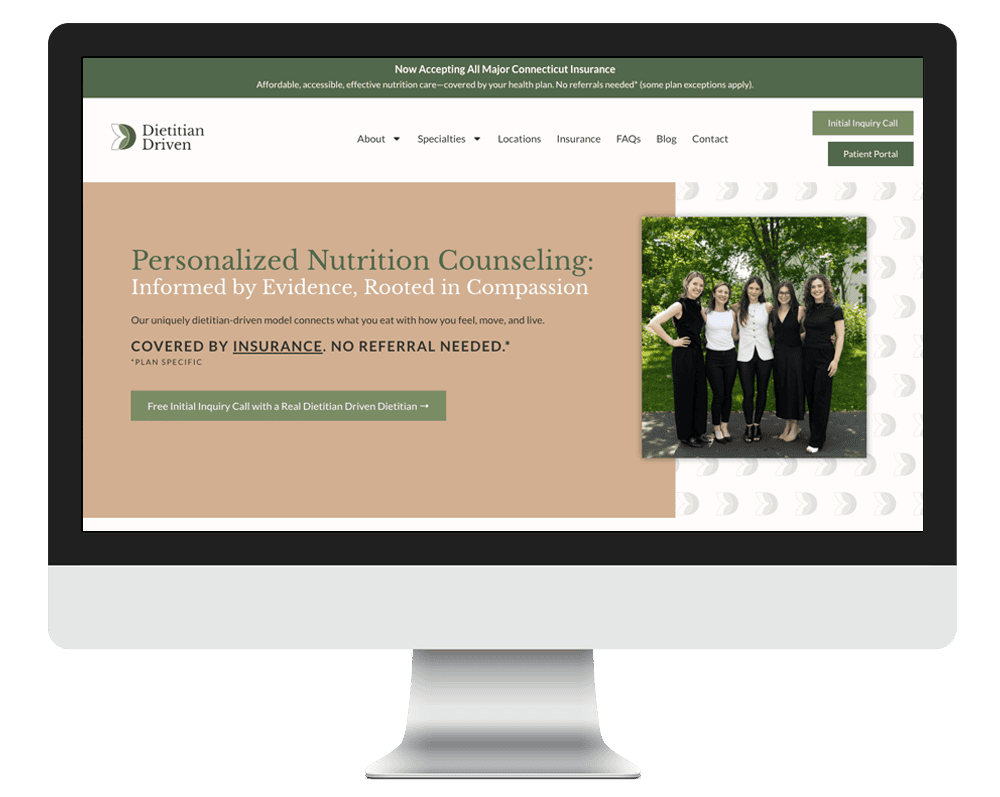
Case Study 1 – WordPress Win: Dietitian Driven
Dietitian Driven came ready for a fresh start. Monica wanted a website refresh that reflected her bold, no-fluff approach to nutrition counseling and client care. We streamlined the navigation, elevated her brand visuals, built out clear service pathways, and created individual pages for each specialty to support SEO and give clients the detailed information they need. We also integrated a blog that’s both beautiful and SEO friendly. The result is a modern, confident site that not only looks the part but works hard behind the scenes, driving traffic, boosting bookings, and finally feeling like the brand.
Case Study 2 – Squarespace Success: Pilates Haus
The Pilates Haus team needed a website built from the ground up for their brand new pilates business. As this was a brand new venture, they also needed help with branding, which was super fun! I started by creating their logo and color palette and choose fonts that matched their vibe. I then built out their site, incorporating their feedback of wanting a site that was very clean, modern and inviting. This site was built in Squarespace.
FAQs
Q: Can I migrate from Squarespace to WordPress?
A: Yes, but design and features will need to be rebuilt. Content can be exported.
Q: Which is more secure?
A: Squarespace handles security for you. With WordPress, security depends on your hosting and maintenance.
Q: Is one better for SEO?
A: WordPress offers more advanced SEO tools; Squarespace covers the basics.
Q: Which is easier to edit?
A: Squarespace is more beginner-friendly; WordPress can be easy with a page builder.
The Wrap Up
Both WordPress and Squarespace can be fantastic for small business websites—it just depends on your goals, budget, and how hands-on you want to be.
Choose WordPress if you want maximum flexibility, scalability, and control.
Choose Squarespace if you want speed, simplicity, and all-in-one convenience.
Let’s talk about your business, goals, and budget. Request a free consultation and we’ll help you choose—and build—a site that works for you.
Free Download! The Ultimate Website Launch Planner
Download this free workbook with everything you need to start your web design journey, whether you’re building It yourself or hiring a professional!
Share:
You May Also Love...
Interested in Custom Web Design Services?