50+ Freebies to Boost Your Website (That You Can Start Using Today)

Ready to level up your website without spending a dime? You’ve come to the right place. Whether you’re running a small biz, launching a side hustle, or just building your passion project, these freebies are your new best pals. We’ve rounded up 50+ free resources in categories like design, SEO, stock photos, fonts, templates, analytics, productivity, marketing—and more. Let’s dive in and start turning those clicks into customers!
Design Tools
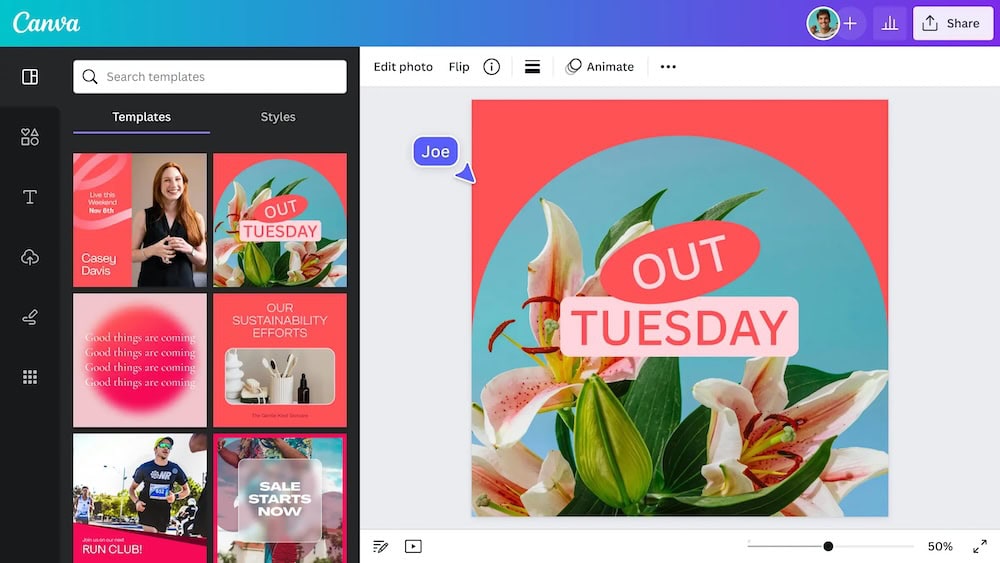
canva.com
What it does:
Amazing for creating graphics, banners, social media visuals, and more.
Why it’s valuable:
Intuitive drag-and-drop interface + loads of templates.
tip:
Use Canva’s “Brand Kit” to keep colors and fonts consistent—even on the free plan.

photopea.com
What it does:
Online image editor that mirrors Photoshop.
Why it’s valuable:
Powerful features with zero downloads.
tip:
Save your files as PSDs to keep editing later.

figma.com
What it does:
Collaborative design tool for UI mockups and prototypes.
Why it’s valuable:
Work with team members in real time.
tip:
Use the “Community” templates to speed up your design process.
SEO & Analytics Tools

databox.com
What it does:
Tracks website traffic, visitor behavior, conversions—everything.
Why it’s valuable:
Deep insights to guide data-driven decisions.
tip:
Set up a “Goal” for newsletter sign-ups or contact submissions.

developers.google.com
What it does:
Monitors site index status and search performance.
Why it’s valuable:
Helps you fix issues and improve visibility.
tip:
Use the “Coverage” report to fix crawling errors quickly.

chromewebstore.google.com
What it does:
Shows keyword volume right in Google results.
Why it’s valuable:
No separate tool, just type and optimize.
tip:
Use it to tweak headings and meta descriptions as you research.
Stock Photos & Graphics

unsplash.com
What it does:
Gorgeous high-res photos from creative communities.
Why it’s valuable:
Truly free (even for commercial use) and abundant.
tip:
Search by color to maintain a consistent palette across pages.

pexels.com
What it does:
Free images & videos.
Why it’s valuable:
Great for blog posts or hero sections that need motion.
tip:
Mix a static image with a muted color overlay and a quote for impact.

flaticon.com
What it does:
Icons in various styles.
Why it’s valuable:
Huge library with PNG, SVG, and vector downloads.
tip:
Stick with one style family for consistency (flat, outline, filled).
Fonts & Typography

designroom.com
What it does:
Loads of web-safe, free fonts.
Why it’s valuable:
Lightweight and optimized for performance.
tip:
Pair a serif headline (e.g., Playfair Display) with a sans serif body (e.g., Lato).

fontsquirrel.com
What it does:
Free commercial-use fonts.
Why it’s valuable:
Easy-to-install desktop versions too.
tip:
Use the “Font Pairings” tool for instant inspo.
Templates & Themes

themakingof.carrd.co
What it does:
Build one-page sites quickly.
Why it’s valuable:
No code, super fast setup, modern templates.
tip:
Add a custom domain on the free plan for polished credibility.

startbootstrap.com
What it does:
Free Bootstrap-based templates.
Why it’s valuable:
Solid foundation for mobile-responsive design.
tip:
Grab a landing page template and customize it for your brand colors.

strikingly.com
What it does:
One-page site builder with built-in hosting.
Why it’s valuable:
Pack options like contact forms, stores—even in the free tier.
tip:
Use the built-in SEO settings to add meta tags easily.
Analytics & Heatmaps

hotjar.com
What it does:
Heatmaps and session recordings to see how visitors interact.
Why it’s valuable:
Understand where users click, scroll, and bounce.
tip:
Watch a single session recording to spot UX hiccups fast.

clarity.microsoft.com
What it does:
Free heatmaps and analytics.
Why it’s valuable:
No cap on traffic or sample size—totally free.
tip:
Compare Clarity’s heatmap with Hotjar for insight triangulation.
Productivity & Collaboration

trello.com
What it does:
Kanban board for organizing tasks.
Why it’s valuable:
Visual and intuitive—perfect for solo or team workflows.
tip:
Use labels like “Design,” “Write,” “SEO” to stay on track.

notion.com
What it does:
All-in-one workspace for notes, docs, databases.
Why it’s valuable:
Customize it to fit blog ideation, content calendars—you name it.
tip:
Embed Google Analytics dashboard right inside your Notion page.

workspace.google.com
What it does:
Docs, Sheets, Drive, and more.
Why it’s valuable:
Powerful collaboration with familiar tools.
tip:
Use “Version history” to roll back edits—no stress, no mess.
Marketing & Social

landingi.com
What it does:
Email marketing tool for newsletters and automation.
Why it’s valuable:
Up to 1,000 subscribers on free plan.
tip:
Set up a welcome series to greet new subscribers with style.

buffer.com
What it does:
Schedule social posts ahead of time.
Why it’s valuable:
Manage multiple platforms from one place.
tip:
Use consistent visuals (e.g., Canva-designed) for extra brand punch.

hootsuite.com
What it does:
Another scheduler with streams and analytics.
Why it’s valuable:
One dashboard for monitoring engagement and performance.
tip:
Try A/B testing captions to see which wording drives engagement.
Performance & Optimization

gtmetrix.com
What it does:
Page speed and performance analysis.
Why it’s valuable:
Actionable recommendations to keep things zippy.
tip:
Run tests from different global locations for better insight.

tinypng.com
What it does:
Compress images without visual loss.
Why it’s valuable:
Faster loading speeds = happier visitors.
tip:
Bulk-size entire folders—then compare image quality at 70–80%.

cloudflare.com
What it does:
CDN, SSL, performance features.
Why it’s valuable:
CDN, SSL, performance features.
tip:
Enable “Auto Minify” for CSS, JavaScript, and HTML for extra speed.
Accessibility & Compliance

webaim.org
What it does:
Checks accessibility issues.
Why it’s valuable:
Helps you make your site inclusive and compliant.
tip:
Run tests after every page update to keep standards high.

developer.chrome.com
What it does:
Audits performance, accessibility, SEO.
Why it’s valuable:
Built right into your browser—no account needed.
tip:
Built right into your browser—no account needed.
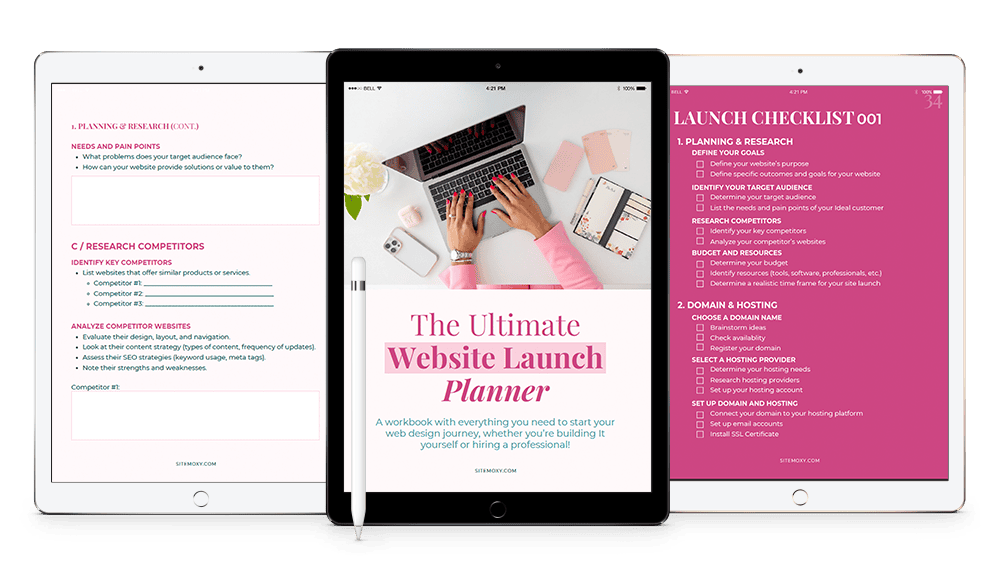
Free Download! The Ultimate Website Launch Planner
Download this free workbook with everything you need to start your web design journey, whether you’re building It yourself or hiring a professional!
Visual Media & Creativity

giphy.com
What it does:
Free animated GIFs for blog posts and social.
Why it’s valuable:
Adds fun, attention-grabbing motion.
tip:
Embed subtle animation in header or blog intro for a playful touch.

lottiefiles.com
What it does:
Lightweight animations that you can embed.
Why it’s valuable:
High-quality, responsive vector animations—easy on load.
tip:
Highlight your CTA with a subtle looping Lottie icon.
Writing & Editing

grammarly.com
What it does:
Checks spelling, grammar, clarity.
Why it’s valuable:
Helps you sound polished and professional.
tip:
Use the tone detector to keep your voice friendly and upbeat.

hemingwayapp.com
What it does:
Highlights complex sentences and readability.
Why it’s valuable:
Helps you write clearly and concisely.
tip:
Aim for 6–8th-grade reading level for maximum reach.
Code & Development Helpers

codepen.co
What it does:
Test HTML/CSS/JS snippets instantly in the browser.
Why it’s valuable:
Safe playground for tinkering and prototyping.
tip:
Fork someone else’s pen to jumpstart your own design.

jsfiddle.net
What it does:
Similar interactive coding playground.
Why it’s valuable:
Great for sharing quick fixes with collaborators.
tip:
Use it to test animations or custom CSS without touching your live site.
Graphics & Illustrations

blush.design
What it does:
Customizable illustrations from artists.
Why it’s valuable:
Unique visuals that feel hand-crafted.
tip:
Stick with a consistent illustration “family” for brand unity.

opendoodles.com
What it does:
Editable doodle-style illustrations.
Why it’s valuable:
Free, quirky, and easy to customize.
tip:
Match doodle colors to your brand palette for consistency.
Video & Multimedia

kapwing.com
What it does:
Online video editor, meme generator, subtitle tool.
Why it’s valuable:
No installs, easy editing, instant visuals.
tip:
Use Kapwing to repurpose blog posts into quick promo clips.

veed.io
What it does:
Video editing, subtitles, filters.
Why it’s valuable:
Good for short explainer videos and social reels.
tip:
Add captions for accessibility—they boost view time too!
Audio & Podcasting

audacityteam.org
What it does:
Free, open-source audio editor.
Why it’s valuable:
Great for podcasts or voiceovers.
tip:
Use noise reduction to clean up background hum.

creators.spotify.com
What it does:
A free podcast creation, hosting, and distribution platform—now fully integrated with Spotify.
Why it’s valuable:
You can record, edit, host, and publish your podcast all in one place, plus get analytics, audience engagement tools (like polls and Q&A), and the ability to distribute to major listening apps automatically.
tip:
Use the Q&A feature to spark interaction with your listeners, then share responses in your next episode to keep engagement high.
E-commerce & Conversion

woocommerce.com
What it does:
Full-featured e-commerce plugin for WordPress.
Why it’s valuable:
Customize your store without paying.
tip:
Use free extensions like Stripe for smooth checkout.

tawk.to
What it does:
Live chat for customer support.
Why it’s valuable:
Engages visitors in real time—boosts trust.
tip:
Save quick replies (like FAQ responses) to save typing time.
Project & Content Planning

airtable.com
What it does:
Spreadsheet-database combo for tracking.
Why it’s valuable:
Organize content calendars, inventory, tasks.
tip:
Use “Gallery” view to preview blog visuals and publish dates.

asana.com
What it does:
Project management tool.
Why it’s valuable:
Track tasks with lists, boards, deadlines.
tip:
Color-code projects by category (blog, product launch, social).
Customer Feedback & Surveys

workspace.google.com
What it does:
Create surveys, quizzes, feedback forms.
Why it’s valuable:
Unlimited responses, simple to set up.
tip:
Add conditional logic to guide respondents based on their answers.

typeform.com
What it does:
Sleek interactive forms and quizzes.
Why it’s valuable:
Keeps folks engaged with conversational interfaces.
tip:
Ask a cheeky opener (“Coffee or tea?”) to warm up your respondents.
AI Content Helpers

businessinsider.com
What it does:
AI writing assistant that helps you brainstorm, outline, draft, and refine everything from blog posts to product descriptions.
Why it’s valuable:
Speeds up the creative process while giving you fresh ideas you might not have thought of yourself.
tip:
Use it to create first drafts only—then infuse your brand voice and personal touch for authenticity.

jasper.ai
What it does:
AI content creation platform for marketing copy, blog posts, and social captions.
Why it’s valuable:
Use the free trial to batch-create content for the month, then refine in your own style.
tip:
Ask a cheeky opener (“Coffee or tea?”) to warm up your respondents.
Miscellaneous Essentials

bitly.com
What it does:
Shorten URLs & track clicks.
Why it’s valuable:
Clean links + basic analytics.
tip:
Customize the back-half of your Bitly link for brand flair.

docs.webrcade.com
What it does:
Another quick link shortener.
Why it’s valuable:
Fast, no signup required.
tip:
Add tags like “blog” or “promo” to track campaigns via URL structure.

chromewebstore.google.com
What it does:
Consolidates all your open tabs into one page.
Why it’s valuable:
Keeps your desktop clutter-free while planning.
tip:
Name tab groups (e.g., “Blog Ideas”) to revisit easily later.

paperform.co
What it does:
Beautiful forms, payments, quizzes.
Why it’s valuable:
Try 14 days for serious lead-gen setup.
tip:
Use trial to test lead magnets before committing.

calendly.com
What it does:
Schedule meetings with zero back-and-forth.
Why it’s valuable:
Streamlines bookings—small biz game-changer.
tip:
Embed your Calendly link in your contact page for instant access.
The Wrap Up
There you have it—over 50 free tools to make your website shine. Whether you’re designing eye-catching visuals, boosting your SEO, tracking analytics, charming visitors with chat, or managing content like a pro, this list has got you. Start by picking just 3–5 goodies that fit your goals. Tinker, test, and watch your site get better—without spending a cent. Your website is your digital HQ—time to make it hum!
Psst… need help turning your site into a lead-generating powerhouse? That’s kind of my thing. 😉
Free Download! The Ultimate Website Launch Planner
Download this free workbook with everything you need to start your web design journey, whether you’re building It yourself or hiring a professional!
Share:
You May Also Love...




Interested in Custom Web Design Services?